Blue iMac M4 Desk Setup: The Pastel Workspace That Turns a Computer Into Furniture
Blue iMac M4 desk setup guide: the 24 inch all-in-one in pastel blue with lavender touch of class, warm wall lamps, and an orange charger as one deliberate accent.

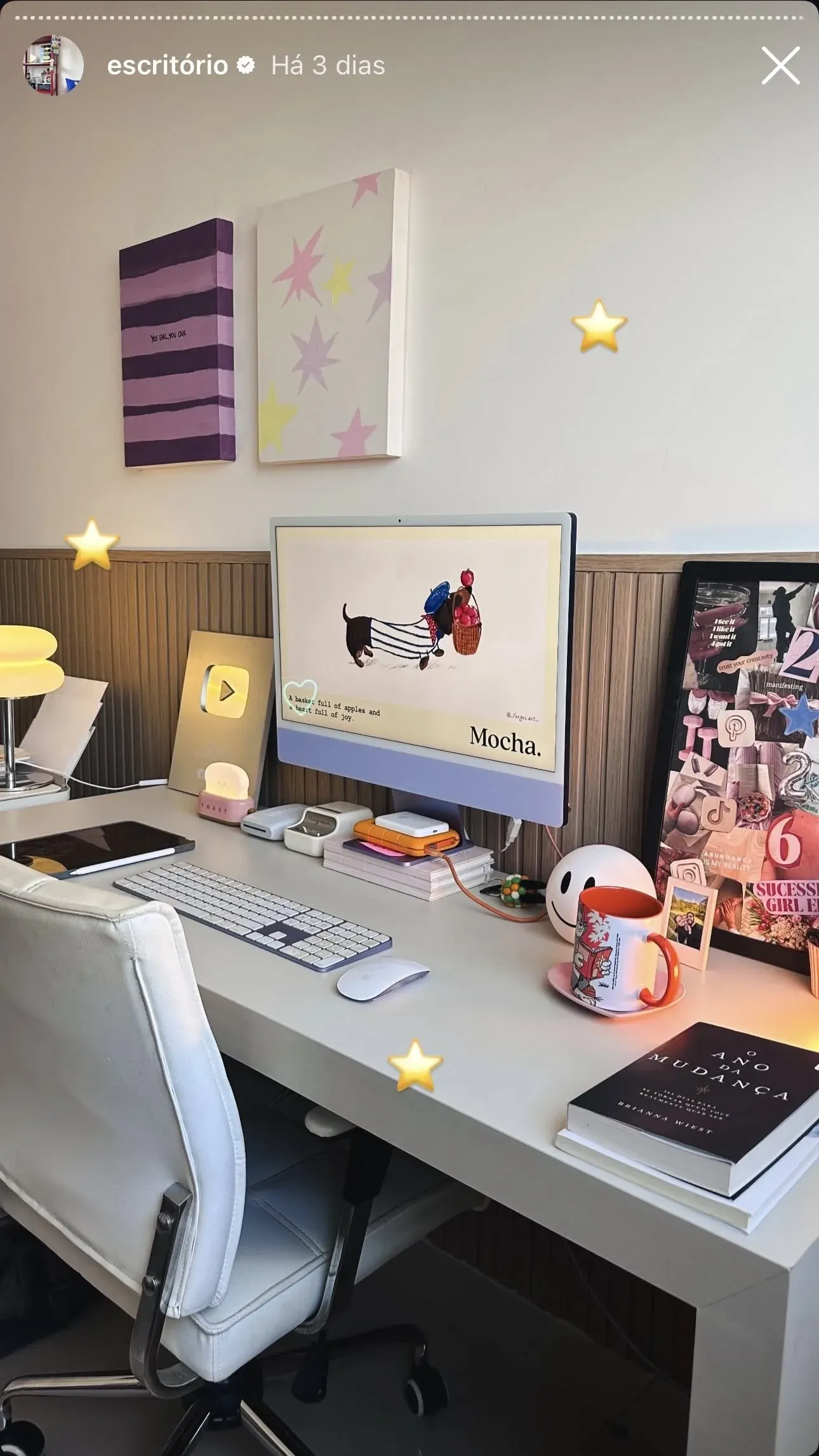
Most computers are boxes you hide under a desk. The iMac is the opposite: a screen, a computer, and a stand in one pastel object that stands on the desk like a piece of furniture. The setup in the photo leans into that idea completely: a blue iMac M4 on a cream desk with warm paper lamps on the wall shelf, a lavender keyboard, and one orange puck of a charger as the single loud accent. When the hardware itself is the color story, the desk stops being an office and starts being the room.
Why the blue iMac M4 works in a pastel room
The color is why this specific computer sells. The M4 iMac ships in four pastel finishes: blue, purple, pink, and green, each with a matching aluminum stand and a color-matched power brick that plugs into the wall instead of the machine. In the photo, the blue front panel sits between two cream lamps and a lavender keyboard and reads as one coordinated palette, something a black monitor on a stand physically cannot do.
The white bezel matters as much as the blue. Most monitors put a black frame around your content regardless of the room; the iMac’s white border keeps the screen edge part of the light color scheme, so the display does not break the pastel line when it shows a bright document or a dark app.
The all-in-one advantage: one cable, zero towers
The quiet spec of the iMac is its cable count. The whole computer, display, camera, microphones, and speakers live in the thin chassis, and the only wire crossing your desk is the color-matched power cord. The setup in the photo shows the result: no PC tower, no monitor arm, no speaker wires, just the screen and small accessories. For a desk that sits in a living space instead of a dedicated office, that simplicity matters because it is what lets the workspace look styled rather than staffed.
The tradeoff is the same as any all-in-one: repair and upgrades are off the table. Choose memory and storage at checkout because the machine is sealed. For that reason the 16 GB base config is the realistic pick in 2026; 8 GB models exist but feel the squeeze the moment Lightroom, a browser with twenty tabs, and a video call share one screen.
What the M4 delivers at the desk
The M4 chip in the 24 inch iMac is a quiet overachiever for desk work. Writing, spreadsheets, scheduling, and photos happen with zero fan noise; the chassis stays at room temperature through a workday. Light video editing is the real strength here: the 2024 M4 iMac cuts through 4K timelines in apps like Final Cut and CapCut without sounding like a vacuum, which the previous M1 base model could not promise at this size.
The screen carries most of the daily experience. 24 inches at 4.5K, 500 nits, P3 wide color: text is set-sharp, photos pop against the pastel case, and the whole surface reads bright in a sunlit room like the one in the photo. People who complain about the iMac’s display usually mean its 60 Hz refresh or the missing nano-texture option; the picture quality itself is excellent for the money.
The accessories that complete the setup
The white Magic Keyboard and Magic Mouse in the photo are the default pairing, functional and color-cohesive but the least exciting part of the kit: the mouse still charges from its underside port, which forces the facepalm flat-charge dance. A Magic Trackpad upgrade is the savvy swap if you scroll more than you click.
🏷 Magic accessories for the iMac desk Magic Trackpad → · USB-C hubs →
Small add-ons carry the personality: a lavender keyboard skin or pastel cable clips, a shelf lamp row like the two paper spheres in the photo, and one warm object in a louder color. Keep the base palette to three tones and let one object break the rule; that single orange charger does more for the composition than a tenth accessory would.
Who this desk setup is for
Students and writers who work in a shared room: the all-in-one footprint leaves desk space for books and notebooks, and the fanless-feeling quiet does not fight with roommates or podcasts.
Editors and creators who want a one-box travel of their office between home and a studio: the iMac moves as one object, one power cable, done. The 24 inch was the outlier when it launched; in a pastel-styled workspace it has become the whole point.
Anyone setting up a home office in a rental: the fastest way to make a rented room look intentional is a computer that adds a color instead of a beige tower and cable chaos.
Verdict
✅ Pros:
- Pastel blue chassis, white bezel, and matching stand make the computer part of the room’s palette
- One power cable: no tower, no monitor arm, no speaker wiring
- 4.5K 500-nit P3 display is set-sharp for text and photos
- M4 keeps desk work silent and handles 4K video cuts
- Sealed design doubles as a long-term furniture decision that still looks current
❌ Cons:
- Memory and storage are fixed at purchase; no upgrades ever
- Base storage starts at 256 GB, which fills up fast with video projects
- Magic Mouse still charges from the bottom port
- 60 Hz screen and no nano-texture option at this price
- Repairability is essentially zero; a failed screen means a new computer
🏷 Complete the pastel desk setup iMac M4 Blue → · Magic Trackpad →
🇩🇪 This article is also available in Deutsch:
Read in Deutsch →
FAQ
Is the blue iMac M4 good for a pastel desk setup?
Yes, the blue iMac M4 is made for it: pastel blue front, blue aluminum stand, and a white screen bezel that match cream, lavender, and light wood instead of fighting them. Black-bezel desktops dominate a pastel palette; the iMac blends into one.
Is the iMac M4 worth it in 2026?
For desk-first users, mostly yes: the M4 chip handles writing, editing, and light video work without noise or a separate tower, and the 24 inch 4.5K screen replaces a monitor purchase. The honest limitation is upgradability: RAM and storage are sealed at order time.
What size desk does a 24 inch iMac need?
Around 100 cm width and at least 60 cm depth. The 24 inch iMac takes the space of a monitor on a stand, not a tower plus screen, so a 120 by 60 cm desk like the one in the photo holds the iMac, accessories, and still leaves working room.
Does the iMac M4 work for photo and video editing?
Yes for editing and youtube-scale exports: the 4.5K display covers the P3 color gamut and holds 500 nits, and the M4 GPU cuts through 4K timelines. Heavy 8K color work still belongs on a Mac Studio with a reference monitor.
How do you keep an iMac desk looking clean?
Give every object a lane: one shelf row for the mood layer, one hidden drawer for cables and drives, and the working lane with only keyboard, mouse, and notebook. The setup in the photo works because the iMac's single-cable design leaves no desk spaghetti to hide.

Continue reading

Palm-Sized Mini PC Guide: What a Computer Smaller Than Your Hand Can Do
Palm mini PC guide: what palm-sized computers with USB ports, microSD slots, and WiFi antennas actually run, real specs at this size, and the honest limits of computers smaller than a hand.
Pocket Linux Computers: Cyberdecks, Handhelds, and the Keyboard That Fits a Jacket
Pocket Linux computer guide: 3D-printed cyberdecks, open-source handhelds like the Pocket Reform, ready-made GPD devices, and Raspberry Pi palmtop builds. What each class does and what they cost.

White Desk Setup for Creatives: Keyboard, Headphones, and a Camera in the Sun
White desk setup guide for creative work: custom mechanical keyboard with artisan keycaps, over-ear headphones, a compact camera within reach, and the discipline of an empty white surface.